Automate social posting with n8n
Import our ready-made workflow: it uploads an image and publishes it through the Crosspostify API. Extend it to all nine platforms and trigger it from anything n8n connects to.
API access is included in the Pro and Business plans.
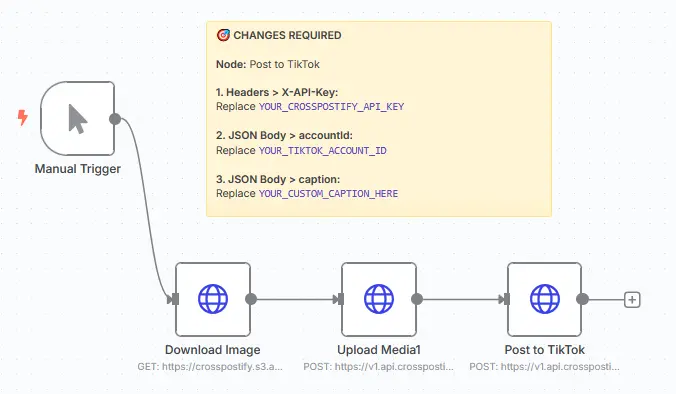
Up and running in four steps
The sticky note in the workflow lists the same changes.
- 01
Download the workflow
Import the JSON file into n8n. It contains the trigger, the image download, the media upload and the post request.
- 02
Add your API key
Copy your key from the API page of the Crosspostify app (Pro or Business plan). In both HTTP nodes, Upload Media1 and Post to TikTok, open Headers > X-API-Key and replace the placeholder.
YOUR_CROSSPOSTIFY_API_KEY - 03
Set the account ID
In Post to TikTok, replace the placeholder with your account ID. You find it in the dashboard or with GET /social-accounts.
YOUR_TIKTOK_ACCOUNT_ID - 04
Customize and run
Point Download Image to your own image, write your caption, add more accounts or platforms, then run the workflow.
Your workflows, every platform
Full automation
Plug publishing into your existing n8n workflows, from RSS feeds to spreadsheets to AI agents.
Nine platforms
TikTok, Instagram, YouTube, Facebook, LinkedIn, Pinterest, Tumblr, Bluesky and Threads from one workflow.
Plain REST API
Standard HTTP Request nodes, no custom node to install. Everything is documented with examples.
Scheduling
Run on n8n's own triggers, or pass a scheduledDate and let Crosspostify publish at a set time.
Build your own nodes on the API
The workflow uses the same public API you can call from any HTTP Request node.
Media upload
Upload images and videos with POST /media and get a media id back.
Publishing
Publish one media file to many accounts in a single request.
Scheduling and status
Schedule posts for later and follow their status with GET /posts.







Your next post could be on nine platforms by tonight.
Connect your accounts, upload once, and let Crosspostify handle the rest. Try it free for 3 days.